資料を作成した時に印刷範囲の設定や改ページを挿入したりするので今回はこちらを紹介します。
VBAでの改ページや印刷範囲の設定方法
改ページの設定
ActiveSheet.HPageBreaks.Add before:=Cells(挿入したい位置)印刷範囲の設定
ActiveSheet.PageSetup.PrintArea = Range(Cells(印刷設定したい初期位置), Cells(印刷設定したい範囲)).Address50枚の写真を読み込ませて処理の実行
写真3枚毎に改ページを挿入する様に設定
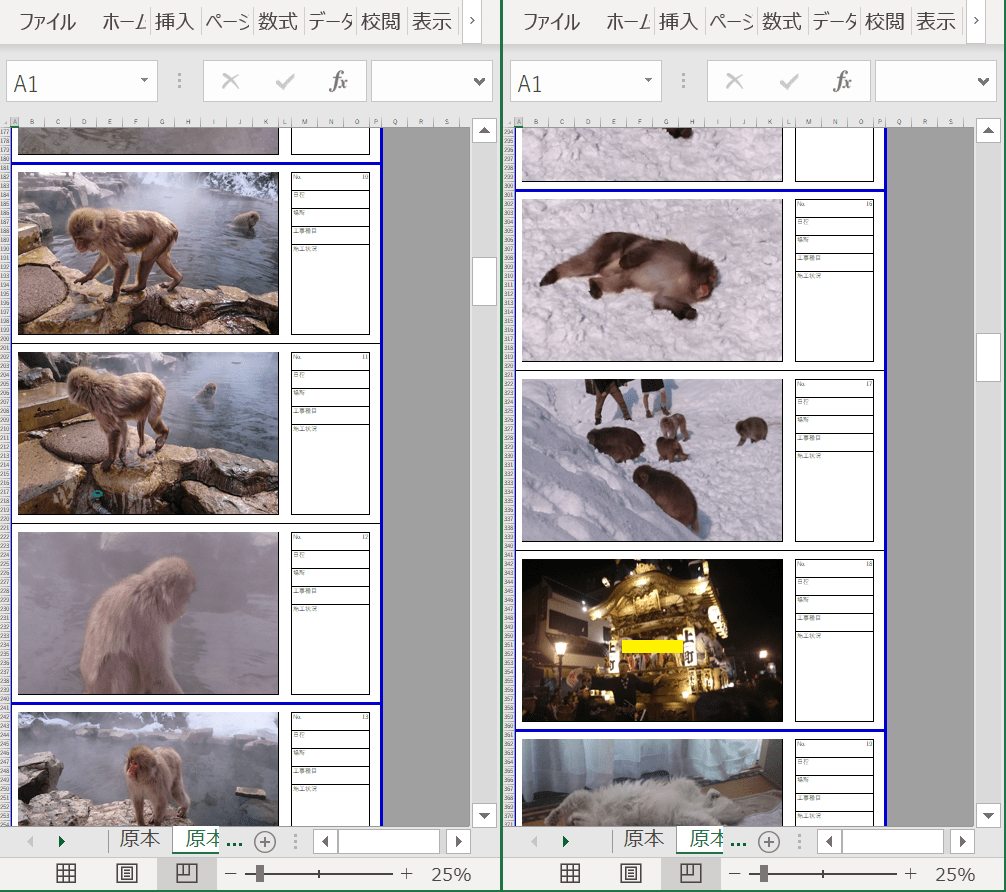
改ページの処理内容
ActiveSheet.HPageBreaks.Add before:=Cells(((i \ 3) * 60) + 1, 1)
印刷範囲の設定
50枚写真を読み込んでいるため51枚目は空白

印刷範囲の処理内容
    Select Case i Mod 3
        Case 1
            str = Range(Cells(1, 1), Cells(k + 58, 16)).Address
        Case 2
            str = Range(Cells(1, 1), Cells(k + 38, 16)).Address
        Case Else
            str = Range(Cells(1, 1), Cells(k + 18, 16)).Address
    End Select

    ActiveSheet.PageSetup.PrintArea = str
写真の枚数に合わせて印刷範囲を設定する事も可能
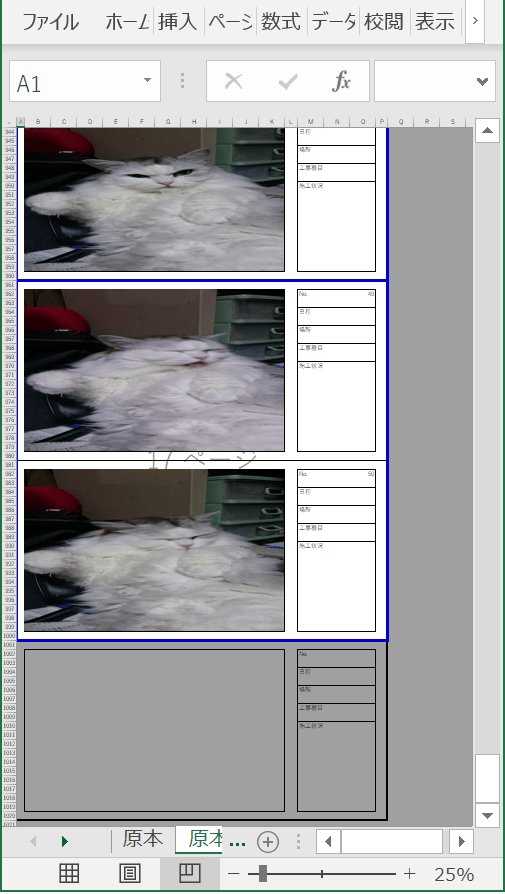
処理内容
    str = Range(Cells(1, 1), Cells(k + 18, 16)).Address

    ActiveSheet.PageSetup.PrintArea = str
写真一括貼り付け処理の改ページの挿入と印刷範囲の設定箇所
Sub 写真張り付け_Click()

    'ループ関数を設定
    Dim i As Integer, j As Integer, k As Integer

    Dim FileName As Variant
    Dim dblscal As Double
    Dim str As String

    Dim startTime As Double
    Dim endTime As Double
    Dim processTime As Double


    '写真の一覧を取得
    FileName = Application.GetOpenFilename( _
        filefilter:="画像ファイル,*.bmp;*.jpg;*.gif;*.JPG", _
        MultiSelect:=True)
    '写真ファイルを選択しなかった場合は処理を終わらせる
    If Not IsArray(FileName) Then Exit Sub

    '処理中画面描写をしない
    Application.ScreenUpdating = False

    '開始時間取得
    startTime = Timer


    '写真を貼る開始セルの列
    j = 2
    '写真を貼る開始セルの行
    k = 2

    '印刷範囲の初期設定
    str = Range(Cells(1, 1), Cells(60, 16)).Address
    '原本シートのコピーを末尾に追加
    Worksheets("原本").Copy After:=Worksheets(Worksheets.Count)
    'ボタンを削除
    ActiveSheet.DrawingObjects.Delete

    '取得した写真リストをセルに貼り付け
    For i = LBound(FileName) To UBound(FileName)
        If i <> 1 And i Mod 3 = 1 Then
            Worksheets("原本").Range(str).Copy
            Cells(k - 1, 1).PasteSpecial
            Application.CutCopyMode = False

'←-------------改ページの挿入
            ActiveSheet.HPageBreaks.Add before:=Cells(((i \ 3) * 60) + 1, 1)
'-----------------→

        End If
        Cells(k, j).Select

        '選択ファイル
        With ActiveSheet.Shapes.AddPicture( _
            FileName:=FileName(i), _
            linktofile:=False, _
            savewithdocument:=True, _
            Left:=ActiveCell.Left, _
            Top:=ActiveCell.Top, _
            Width:=ActiveCell.Width * 10, _
            Height:=ActiveCell.Height * 18)
            '結合セルの大きさに設定する場合は下記の内
            'Height:=ActiveCell.MergeArea.Height, _
            'Width:=ActiveCell.MergeArea.Width)
        End With

        '写真の貼り直し
        ActiveSheet.Shapes(i).Select
        Selection.Cut
        ActiveSheet.PasteSpecial Format:="図 (JPEG)", Link:=False, DisplayasIcon:=False
        Application.CutCopyMode = False


        'Noに数を記入
        Cells(k, j + 13) = i

        '次のセルの位置を設定する
        k = k + 20

    Next i

    i = i - 1
    k = k - 20

'←--------------------------------------
    '印刷範囲を設定
    Select Case i Mod 3
        Case 1
            str = Range(Cells(1, 1), Cells(k + 58, 16)).Address
        Case 2
            str = Range(Cells(1, 1), Cells(k + 38, 16)).Address
        Case Else
            str = Range(Cells(1, 1), Cells(k + 18, 16)).Address
    End Select

'    str = Range(Cells(1, 1), Cells(k + 18, 16)).Address

    ActiveSheet.PageSetup.PrintArea = str
'----------------------------------→

    '写真のズレを修正
    ActiveSheet.Shapes.SelectAll
    Selection.ShapeRange.LockAspectRatio = msoFalse
    Selection.ShapeRange.Height = Cells(2, 2).Height * 18
    Selection.ShapeRange.Width = Cells(2, 2).Width * 10

    '終了時間取得
    endTime = Timer

    '処理時間表示
    processTime = endTime - startTime
    MsgBox "処理時間:" & processTime

    Cells(1, 1).Select

    '画面描写を実行
    Application.ScreenUpdating = True

End Sub
今回も処理の内容を説明させて頂きました。
次回は処理全体の流れを説明します。
 EXCEL VBA 業務の自動化を目指す